



N. modello
ACMINK
Autura™ Ink Software
New
Per la formulazione e il controllo qualità
- Piattaforma nativa cloud serverless protetta
- Interfaccia utente basata su workflow con formulazione e controllo qualità integrati
- Corrispondenza del colore ai vertici della categoria, supportata dalla creazione di assortimenti intelligenti
Premessa
![BestMatch]()


![autura-bronzing]()



Specifiche
Supporto
Risorse
Video


L'innovazione nel campo degli inchiostri inizia con Autura Ink
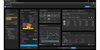
Accelera la gestione degli inchiostri con Autura Ink, una soluzione completa per formulazione e controllo qualità per fornitori di inchiostri, stampatori e converter. Autura Ink è una piattaforma cloud centralizzata, accessibile ovunque, per tutte le esigenze di formulazione, archiviazione, approvazione, recupero e controllo qualità degli inchiostri offset, flessografici, rotocalco e serigrafici.
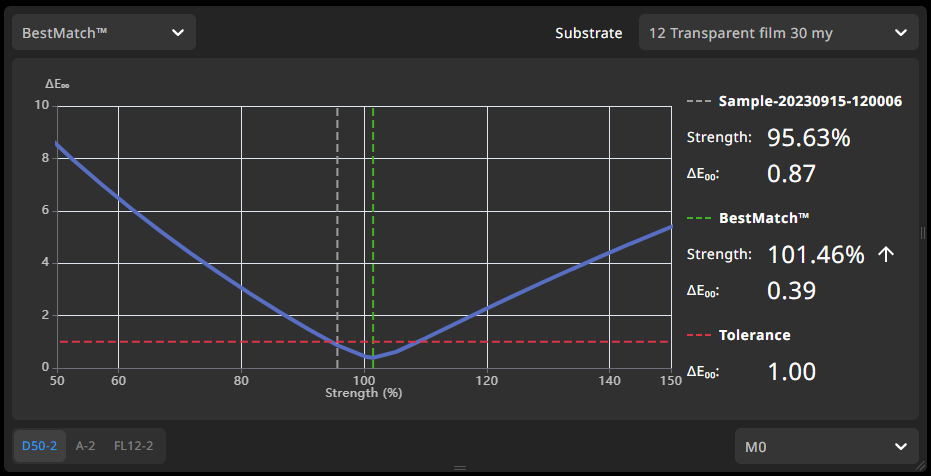
Identifica rapidamente le variazioni di colore dell’inchiostro
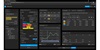
Ogni minuto di fermo macchina a causa di mancata corrispondenza del colore è una perdita di profitto. Grazie alla funzione BestMatch integrata, gli operatori possono determinare con certezza se si può ottenere un colore modificando lo spessore del film, la viscosità o le impostazioni della macchina da stampa, oppure se la formulazione dell'inchiostro deve essere rettificata. In questo modo, le prestazioni della macchina da stampa vengono ripristinate rapidamente, riducendo i tempi di fermo.
Riduci del 50% le interruzioni delle tirature
Grazie alla funzione Quick Correction, gli addetti agli inchiostri possono eseguire le rettifiche necessarie per correggere un lotto di inchiostro accanto alla macchina da stampa. Ciò garantisce che l'inchiostro rimanga entro le stesse specifiche di quando ha lasciato il laboratorio, riducendo i tempi di fermo macchina e prove di stampa inutili.
Crea modelli di formulazione dell’inchiostro a prova di errore
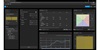
Autura Ink ottimizza l'onboarding del personale e riduce il rischio di costosi errori. Gli utenti possono configurare modelli per le formulazioni con impostazioni predefinite personalizzate in base ai casi di utilizzo di ogni cliente. Ciò migliora la ripetibilità e la produttività e l'intero team può gestire i diversi requisiti di formulazione in modo efficiente.
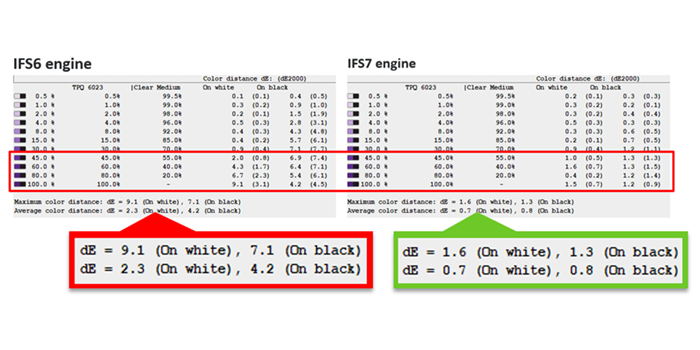
Rilevazione e correzione automatica dei problemi di bronzatura
"Il motore di formulazione IFS 7.0 di Autura Ink rileva le anomalie di bronzatura e le corregge automaticamente durante la formulazione delle ricette. Come parte di Autura Desktop Assortment Builder, questa funzione garantisce che i dati relativi agli inchiostri siano a prova di bronzatura fin dall'inizio, aiutando gli operatori a evitare costosi difetti, a ridurre gli scarti e a garantire una qualità di stampa costante. "
Efficienza operativa standardizzata
Autura offre una piattaforma centralizzata per assicurare che tutti gli utenti abbiamo accesso alla versione più recente, ovunque e in qualsiasi momento.
Piattaforma cloud protetta
La tecnologia cloud Autura garantisce la sicurezza dei tuoi dati e richiede un'assistenza IT in loco minima.
Visualizzazione assortimenti di inchiostro efficienti
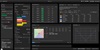
Le visualizzazioni assortimenti di Autura permettono di gestire gli assortimenti ed eliminare le duplicazioni.
Autura Ink Software
Design e Premedia
Sviluppo / Formulazione
Produzione
Controllo Qualità
Specificazione
Specifications
Specifiche
| Differenze cromatiche | DL*, Da*, Db*, DC*, DH*, DE76, DE94, DE2000, DECMC |
| Spazi cromatici | CIE L*a*b*, CIE L*C*h° |
| Opzioni di configurazione | Software As a Service |
| Connettività | USB or WiFi with X-Rite Device Bridge |
| Export Format | ifrx, cxf, ajs |
| Illuminanti | A, C, D50, D55, D65, D75, FL1-FL12 |
| Import Format | ifsx, ifbx, ifrx, ifpx, ifgx, iftx, iffx, mif, cxf, abbx, absx, abgx, cqsx, cqbx, cqjx, ajs |
| Lingue supportate | Arabic, Chinese Simplified,Chinese Traditional, German, Greek, English, Spanish, French, Italian, Japanese, Korean, Polish, Portuguese, Turkish |
| Condizioni di misurazione | 45/0 (M0, M1, M2, M3), d8 (SPIN, SPEX), Multi-Angle |
| Osservatori | 2 degree, 10 degree |
| Supporto PantoneLIVE | Basic and Premium |
| Pass / Fail | DL*, Da*, Db*, DC*, DH*, DE76, DE94, DE2000, DECMC, Color Strength |
| Sicurezza | Annual penetration tests and security audits before each release |
| Indici standard | Opacity, Metamerism |
| Dispositivi supportati | eXact, eXact 2, Ci62, Ci64, Ci64UV, Ci7500, Ci7600, Ci7800, MA3, MA5, MA-T12, MA-T6, MA-T5 |
| Contenuto | Fully managed in the Cloud with regular data backup and disaster recovery |
| Minimum System Requirements | |
| Spazio su disco disponibile | 5GB free space |
| Risoluzione display | 1920x1080 |
| Connessione Internet | Broadband |
| Memoria | 2GB |
| Processore | 12th Generation Intel Core i5 running at 3.2Ghz |
| Web Browser | Chrome 111, Edge 111, Firefox 114, Safari 16.4 |
Supporto
Risorse
Video
Come creare un nuovo standard nel software Autura Ink
Questo rapido tutorial ti guida attraverso l'accesso agli standard disponibili, l'acquisizione delle misurazioni e l'attivazione del nuovo standard con facilità.
Visualizza e gestisci le fasi della formulazione nel software Autura Ink con la struttura dei dati
Scopri come spostarti nella struttura dei dati del software Autura Ink per visualizzare e gestire ogni fase del processo di creazione delle formulazioni, dagli standard alle correzioni.
Find Recipes Fast in Autura Ink Software Using Data Filters
Learn how to quickly find recipes in Autura Ink Software by applying data filters. This video shows you how to add filters, select options, and view matching results instantly.
Gestisci, cerca e attiva azioni nel software Autura Ink utilizzando gli oggetti dati
Scopri come accedere agli oggetti dati e gestirli nel software Autura Ink. Questo video mostra come visualizzare, ordinare e cercare i dati nonché come attivare le funzioni chiave per una gestione efficiente del workflow.
Condividi e personalizza facilmente le formulazioni nel software Autura Ink utilizzando i modelli di stampa
Scopri come condividere le formulazioni utilizzando i modelli di stampa nel software Autura Ink. Questo video mostra come generare, scaricare e personalizzare i modelli per una gestione efficiente delle formulazioni.
Come usare tag e proprietà nel software Autura Ink per organizzare i dati in modo efficiente
Scopri come gestire e organizzare i dati nel software Autura Ink usando tag e proprietà. Questo video mostra come aggiungere, modificare e personalizzare i metadati per formulazioni e altro.
Personalizza la dashboard nel software Autura Ink con i widget
Scopri come personalizzare la tua dashboard nel software Autura Ink con i widget. Questo video mostra come aggiungere, rimuovere, ridimensionare e organizzare i widget per un workflow personalizzato.
